
Video Audition - Summer Stage Productions
Overview
After registering, upload a video audition using the instructions below.
You will submit one video audition covering all summer stage productions that you registered for.
Callbacks will be scheduled based on review of video auditions. We will contact you within one week of receiving your audition.
Prepare Your Songs
Select two contrasting musical theatre songs.
You may select from PPAC’s Grades 8-12 Audition Songs or other musical theatre songs that best showcase your singing.
If using songs not from the link above, obtain a backing track that has no vocals.
Pick songs that best fit your personality and are easily within your vocal range (high notes sung with NO straining).
Memorize 16 to 32 bar cuts of each of your selected songs.
Rehearse singing confidently and clearly with verbal and physical expression.
VIDEO AUDITION INSTRUCTIONS
DO NOT RECORD YOUR VIDEO until you have FULLY READ ALL INSTRUCTIONS BELOW.
Do not dress in costume or use props
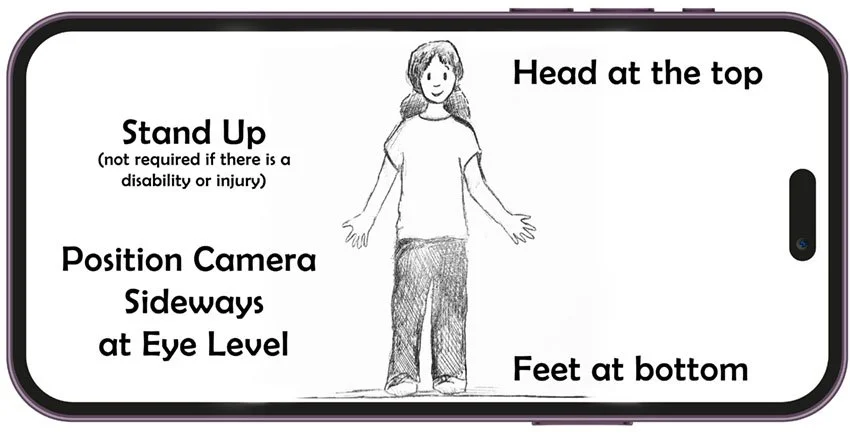
Stand Up (sitting is permitted if you are injured or have a disability)
Position your camera sideways with your head all the way at the top and feet at the bottom.
Make sure your video is framed as in this screenshot:
Record one continuous video including all three parts below in the order shown. Do not pause, edit or combine videos.
1) Speak “My name is (first name) (last name) and I am auditioning for PPAC Summer Stage”
2) Perform your first song (16 to 32 bars) using a backing track with no vocals
3) Perform your second song (16 to 32 bars) using a backing track with no vocals
Upload only one continuous unedited video using this link.